Your AI Support Agent. On your website, trained on your business.
Embed a chat widget that already knows your prices, policies, and opening hours. Visitors get answers in seconds — your team only steps in when the AI hands the conversation over.
Personal onboarding · 14-day free trial · No credit card
AI
InboxMate
Online · Replies instantly
AI
Hi! 👋 How can I help you today?
Do you offer refunds?
AI
Yes! All plans come with a 14-day free trial — full Pro features, no credit card needed. 🎉
AI
Type a message...
Powered by InboxMate
What your visitor sees
Instant answers, in your brand.
Your visitor opens the widget, types a question, gets the answer in seconds. If the AI can't handle it, it hands the conversation to your team with full context — they pick up right where the bot left off.
No developers needed. No complex setup. Just paste, train, and embed.
1
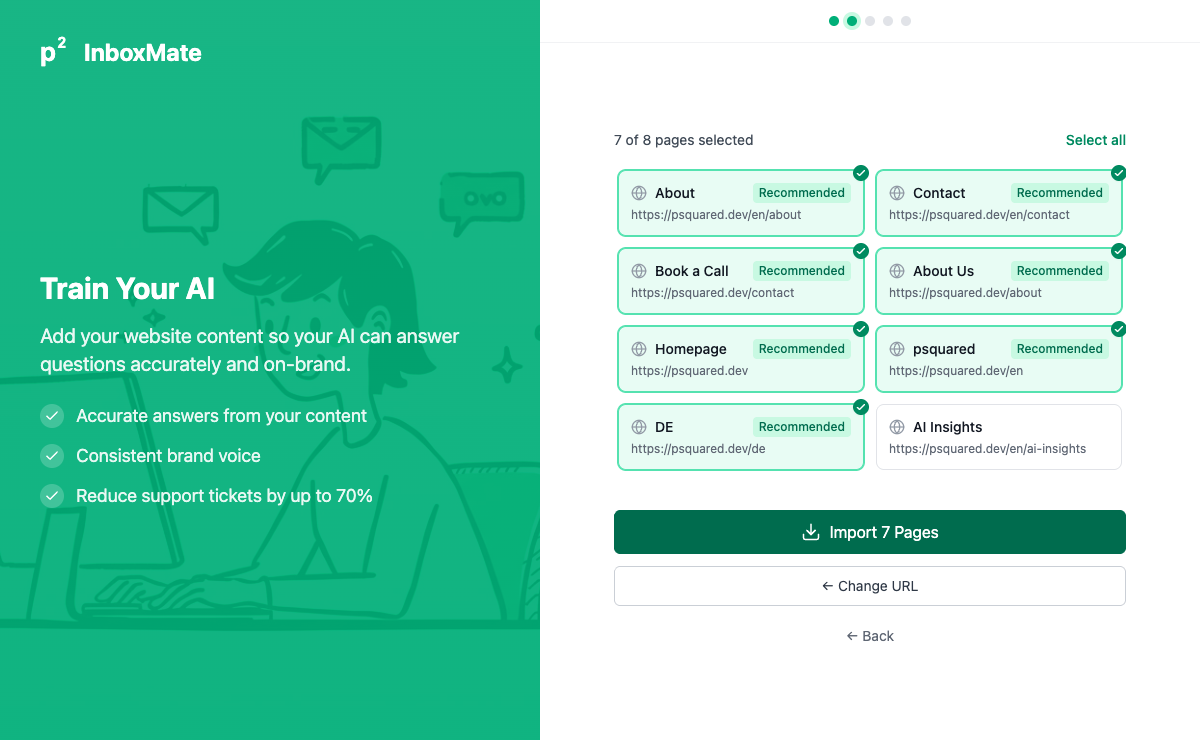
Paste your website URL
Enter your website address and InboxMate automatically crawls your pages. Select which pages to import — your AI learns your content in seconds.
2
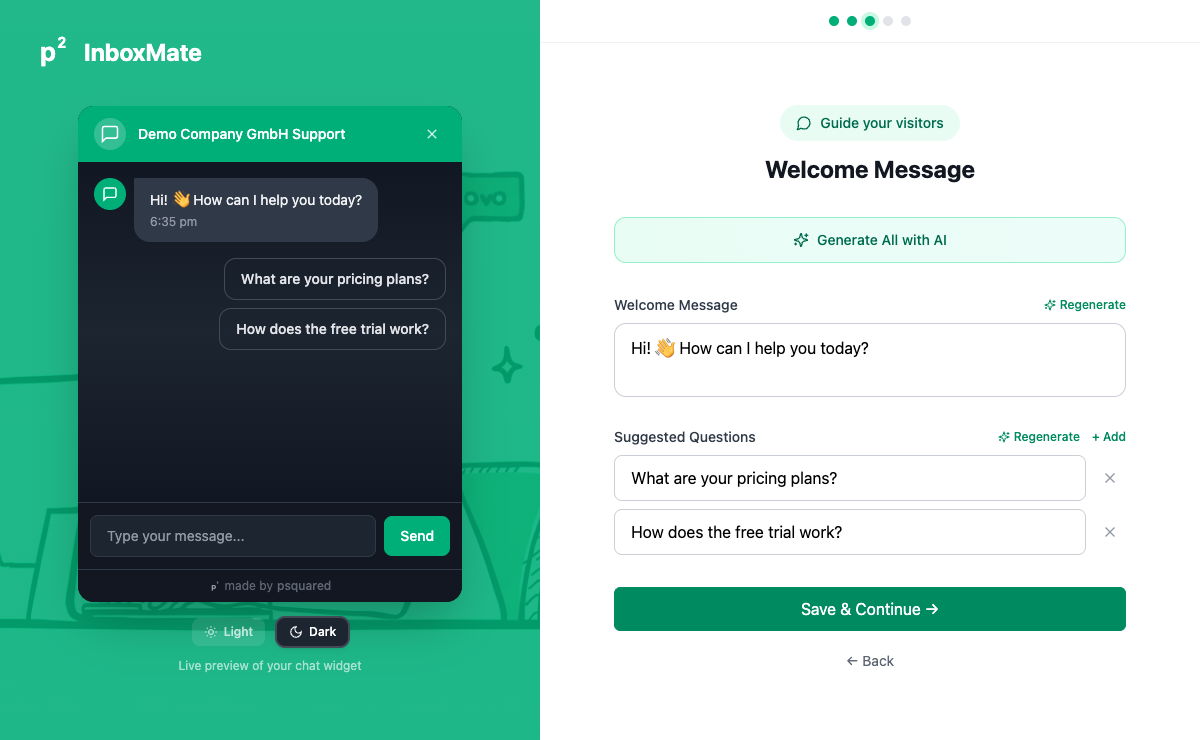
Customize your AI assistant
Set the welcome message, suggested questions, and brand colors. Preview your chat widget live as you make changes — what you see is what your customers get.
3
Embed one line of code
Copy a single script tag, paste it into your website, and your AI support agent is live. Works with WordPress, Shopify, Webflow, or any HTML site.
index.html
<!-- Add before </body> --><scriptsrc="https://cdn.psquared.dev/widget.js"data-agent="your-agent-id"></script>
Works with every platform
WordPress
Shopify
Webflow
Wix
Squarespace
Any HTML site
A widget your visitors actually use
What the chatbot does, in plain language.
No generic LLM. No black box. The widget speaks your business — and hands off cleanly when it can't.
Knowledge
Trained on your site, not the internet
Paste your homepage and we scrape every page. Drop in PDFs and FAQs. The widget answers from your knowledge — and cites the source.
Embed
One script tag, any site
WordPress, Shopify, Webflow, Wix, plain HTML — paste one line before </body> and the widget is live.
Brand
Looks like your site, not ours
Set the brand colour, the welcome message, the suggested prompts. White-label available on Business.
Handover
Hands over with full context
When the AI gets stuck — complaint, edge case, irate customer — your team picks up the live thread with everything the bot already learned.
Languages
Replies in the visitor's language
Detected from the first message. German guests get German answers. English tourists get English. No language switcher required.
Lead capture
Captures the email, not just the question
If the visitor's question hints at a booking or quote, the widget asks for their email. You wake up to qualified leads, not "thanks for asking".
The pain we remove
A visitor with a question shouldn't have to wait for office hours.
Every unanswered "are you open Saturday?" at 9pm is a booking that goes to your competitor.
73%
questions resolved without you
Opening hours, prices, parking, accessibility — answered from your site the moment they're asked.
< 3s
to first reply
No "we'll get back to you within 24 hours". The visitor gets a real answer before they have time to alt-tab.
24/7
on, including weekends
Friday evening, Sunday morning, Christmas Eve — the widget answers. Your team doesn't.
0
contact-form abandonments
No more "I'll fill out the form later". The widget captures the lead in one short conversation.
Beyond Q&A
The widget doesn't just answer — it acts.
Connect it to your booking system, your CRM, your inventory. The widget can quote, schedule, look up, escalate — all from the same conversation.
Connects via MCP servers, HTTP webhooks, or our growing native-integration list.
What it can do, today
Look up a booking by reference, then change the date.
Quote a group rate, then send the booking link.
Check live availability, never promise a slot that's already sold.
Escalate to a human with the full transcript when needed.
Send the visitor a confirmation email — drafted, on your domain.
Personal onboarding included
Your competitors are already using AI for support.
Every unanswered question outside business hours is a lead walking away. InboxMate handles it — instantly, accurately, in your customer's language.
Simple, transparent pricing
Pay per mailbox. AI work runs on credits — included monthly, top up anytime. Setup and rule-based sorting are free.
14-day free trial · No credit card required · Invoiced monthly · How do credits work?
All prices excl. VAT.
Switching from another platform? See how InboxMate compares to Chatbase or Intercom
Built by psquared — an Austrian AI company trusted by
Built with privacy and compliance at the core
Software made in Austria
Hosted in the EU
GDPR-compliant data processing
EU AI Act compliant
Frequently asked questions
We onboard you in a personal call. We connect your data, configure your categorizers, and set up your first agents together — typically a 30–60 min session. After that you can refine on your own, and we stay available for the first months for any questions.
Not at all. You embed InboxMate with a single <script> tag — just copy and paste it into your website. We provide step-by-step guides for WordPress, Shopify, Wix, Webflow, Squarespace, and any custom HTML site. If you can paste a line of code, you can set up InboxMate.
InboxMate works with any website that supports custom HTML or JavaScript. That includes WordPress, Shopify, Wix, Webflow, Squarespace, Ghost, Framer, custom-built sites, and more. If your site has a <body> tag, InboxMate works.
After your 14-day trial ends, your account is paused until you choose a plan. Your data is preserved for 2 months. Pick Starter (€59/mo), Pro (€129/mo or €107/mo billed annually), or Business (€399/mo, custom). Annual billing on Pro includes 2 months free. No credit card required during the trial.
Yes. All plans are month-to-month with no contracts. Upgrade, downgrade, or cancel anytime — changes take effect immediately and billing is prorated.
Credits are one currency for all AI work, included every month with every plan (500 on Starter, 2,500 on Pro, 15,000 on Business) — top up anytime at €40 per 1,000. The unit is the run: putting one email through triage costs a flat 2 credits no matter how many steps the rule attaches to it. Forwarding, filing, archiving, opening a ticket, the AI's tool calls and reading a PDF attachment are all covered. Only these cost extra: a reply draft (1), an outgoing or automatic reply (1), a webhook (0.5), OCR on a scan (1) and a company lookup (5). Rule of thumb: emails per month times two, plus one credit for every reply you want written.
Nothing breaks mid-conversation. At 80% of your monthly credits we send a heads-up email. At 100% your agents keep working through a 20% grace buffer. Once that's exhausted, AI actions pause until your next billing cycle or a one-click top-up — credits are available immediately and invoiced monthly. Rule-based sorting and routing keep running the whole time, since they never use credits.
InboxMate builds a knowledge base from your website content. During setup, it automatically scrapes your pages and learns from the content. You can also upload PDFs (product manuals, FAQs, price lists) to expand its knowledge. The AI uses this data to answer questions accurately — it's trained on YOUR business, not generic data.
InboxMate supports all major languages automatically. It detects the visitor's browser language and responds accordingly — no extra configuration needed. You can also set custom greeting messages per language. This is especially useful for businesses in multilingual markets like Austria, Switzerland, or the Nordics.
Yes. If the AI can't answer a question or if a visitor specifically requests a human, the conversation is seamlessly handed over to your team. You get email notifications for handovers and can respond directly from the InboxMate dashboard. The AI also provides a suggested reply draft so your team can respond faster.
Email and your website chat widget — both handled by the same agent with the same knowledge. Phone support is available as an early-access beta. For anything else, your agent can trigger webhooks and call external tools, so notifications can reach the systems you already use.
Yes. Starting from the Starter plan, InboxMate includes built-in ticket management. The AI can automatically suggest creating tickets from conversations, categorize them by priority, and route them to the right team member. On Pro and Business plans, you also get Categorizers — you define your own categories and the AI sorts every incoming email (and inactive chat) into one, then runs the actions you configured: archive, create a ticket, notify your team, call a webhook, or auto-reply with AI. Each action runs in suggest mode (human approves) or auto mode (Business only).
Yes. Every email gets an AI-drafted reply from your knowledge base — review and send with one click, edit, or regenerate. On Pro, you can configure an "AI reply" action on any category so a pre-generated draft is waiting in the inbox the moment the email arrives. On Business, the same action can run fully automatically — no human in the loop for routine questions, while edge cases still flow to your team.
Yes. You can connect Outlook directly via OAuth — works with both Microsoft 365 work accounts and personal Outlook.com / Hotmail accounts. Beyond just reading mail, automated actions are mirrored in your real Outlook mailbox: a message archived in InboxMate moves to your Outlook Archive folder, a category tag shows up as a coloured Outlook category, and AI-drafted replies appear in your Outlook Drafts folder — threaded under the original message, with your signature already in place. Review and send from Outlook on mobile or desktop without ever opening InboxMate. Replies sent from InboxMate go through your actual Outlook account and land in your real Sent folder. No IT-admin approval needed for the consent — users sign in themselves. Gmail OAuth is currently a closed beta for allow-listed domains; Gmail and every other provider (IONOS, FastMail, etc.) already work today via simple email forwarding.
AI tools let your chatbot take actions beyond just answering questions. For example, you can give your agent a "Check order status" tool that looks up real-time data from your backend, or a "Book appointment" tool that integrates with your calendar. Tools are configured in the dashboard — no coding required for standard integrations. On the Business plan, you can connect custom tools via the MCP (Model Context Protocol) server.
MCP (Model Context Protocol) is an open standard that lets AI agents connect to external tools and data sources. With MCP support from the Pro plan (€129/mo), your InboxMate agent can securely connect to your CRM, ERP, helpdesk, or any system that exposes an MCP server. This enables powerful automations: looking up customer records, checking inventory, creating orders — all within the chat conversation, without custom development.
Yes. On the Business plan, you get full API access to manage conversations, contacts, knowledge base, and analytics programmatically. This is useful for integrating InboxMate into your existing workflows, building custom dashboards, or syncing data with your CRM or analytics tools.
Yes, fully. InboxMate is built by psquared GmbH, an Austrian company. All data is hosted in the EU (Frankfurt), with AI processing in Sweden. We're GDPR compliant by design: your business data is never shared with third parties or used to train other models. On the Pro plan, you get advanced compliance mode (EU) with configurable data retention policies and conversation deletion on request — ideal for regulated industries like law, healthcare, and finance.
All data is stored in EU data centers. We use Supabase (hosted in the EU) for our database and storage. Your knowledge base, conversations, and contact data never leave Europe. This is important for businesses that need to comply with EU data residency requirements.
Absolutely. You can set your brand color, choose between light and dark themes, customize the welcome message and suggested questions, and position the widget on the left or right side of your page. On the Pro plan, you can remove the "Powered by InboxMate" badge and add your own custom branding. On the Business plan, you get full white-label branding for a completely custom look.
Ready to get your time back?
AI-powered automation for your business — set up with our team, not by yourself.
 InboxMate